


Please configure
Learn about add-on allowance
Find out what add-on allowance is and how it shows up on your Spark bill.
Add-on allowance
Add-on allowance is a monthly allowance you can use towards your choice of eligible subscriptions with Spark.
You get add-on allowance when you have one or more Spark Access Mobile plan on your account. Different Access plans come with different amounts of add-on allowance. See available Access Mobile plans
To use your add-on allowance, add eligible subscriptions to the same Spark account and activate them. You can do this in MySpark or the Spark app, or when you're buying your mobile plan.
If you later cancel your Access plan or change to a plan without add-on allowance, your subscriptions will continue until you cancel them.
Add-on allowance on your Spark bill
Your add-on allowance will appear in the Monthly Charges section of your Spark bill if you've added and activated one or more eligible subscriptions.
In the Monthly Charges, you will see:
- The monthly charges for your plans
- The monthly charges for your subscriptions
- The amount of add-on allowance applied towards the bill
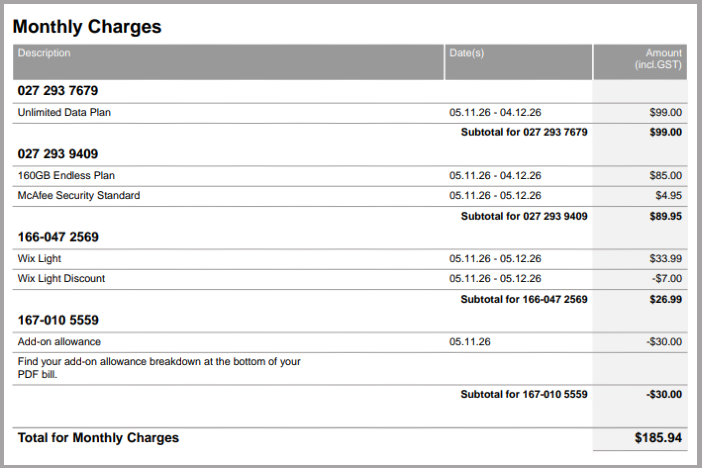
How much add-on allowance will be applied
- If the total cost of subscriptions on your bill is less than your available add-on allowance, you'll only see the amount needed to cover the cost applied. For example, if your plans give you $20 of add-on allowance but you only have one subscription which costs $18.99, the amount of add-on allowance applied on your bill will be $18.99. Unused add-on allowance does not roll over.
- If the total cost of subscriptions on your bill is more than your add-on allowance, you will pay the difference. For example, if your plans give you $20 of add-on allowance but your subscriptions cost $25.99, the amount of add-on allowance applied to your bill will be $20 and you will pay the remaining $5.99.
Please note, if you make changes to your plan or subscriptions close to your billing date, you might see the add-on allowance applied on the following bill instead.
Add-on Allowance Summary
The Add-on Allowance Summary appears at the end of your PDF bill. It provides a breakdown of where your add-on allowance came from and what it was used for.
Please note, this summary is information only. The actual charges and credits are included in the Monthly Charges section of your bill.
The Add-on Allowance Summary shows:
- Allowance Source: Which plan(s) contributed add-on allowance to your account
- Earned add-on allowance: The total amount of add-on allowance you had available
- Allowance Usage: The eligible subscriptions your add-on allowance was applied towards
- Total add-ons spend: The total cost of your eligible subscriptions
- Add-on allowance issued this month: The amount of add-on allowance applied to your bill
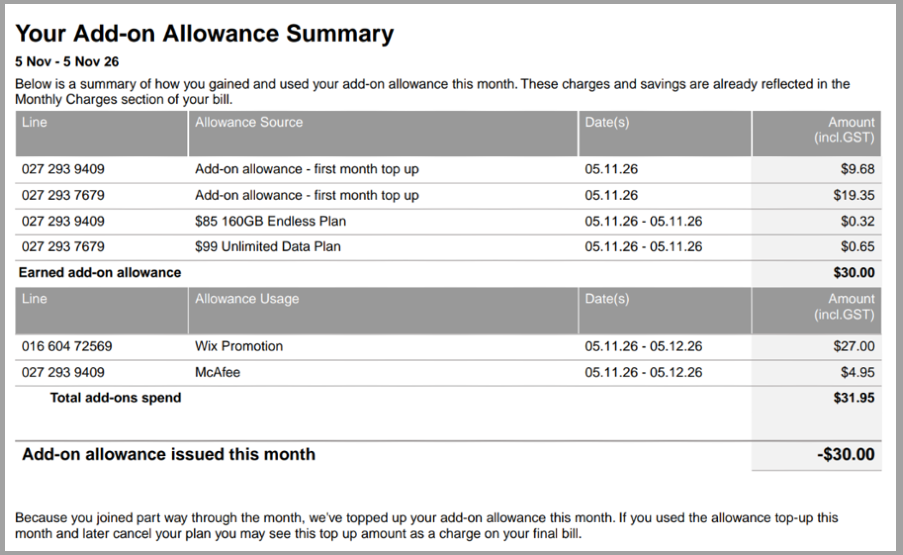
First month top-up
If you joined an Access Mobile plan part way through your billing month, you may see a first month top up amount for add-on allowance. This means you got the full value of your add-on allowance for the month.
If you use the first month top up towards eligible subscriptions and later cancel your Access plan or change to a plan without add-on allowance, some or all of the top up may be reversed. The reversal may appear on the next bill or the following bill after the change or cancellation.
Related articles: